Best AI Creative Tools for Ecommerce Teams in 2026
A practical comparison of Hiding Elephant, Pletor, Canva, Photoroom, Recraft, and Adobe for ecommerce teams that need product context, design control, and batch production.

Most “best AI tools for ecommerce” lists still compare image generators.
That is the wrong shortlist for most ecommerce teams.
Your bottleneck is rarely “can AI make a nice product shot?” It is whether the team can turn real SKUs into accurate, on-brand, channel-ready creative at volume, without losing the ability to fix what AI gets wrong.
This guide compares six tools ecommerce teams actually evaluate:
- Hiding Elephant for product-aware creative production with hands-on design and batch workflows
- Pletor for reusable AI creative infrastructure
- Photoroom for catalog cleanup at scale
- Canva for template-led marketing production
- Recraft for AI image, vector, and mockup assets
- Adobe for deep professional editing inside Creative Cloud
The winning tool is not the one with the most impressive demo image. It is the one that protects product truth, keeps designers in control, and still scales across the catalog.

At a glance
Hiding Elephant is our top overall choice for ecommerce teams that need product context, manual creative control, and batch production in one system.
It is not the best specialist for every task. Photoroom may win on pure catalog cleanup speed. Canva may be easier for a broad marketing org shipping template campaigns. Adobe still leads on deep professional finishing. Recraft is particularly strong for editable vectors and mockups. Pletor is the closest alternative when the priority is reusable AI production systems.
| Tool | Best for | Product context | Manual creative control | Batch production |
|---|---|---|---|---|
| Hiding Elephant | End-to-end ecommerce creative production | Strong | Strong | Strong |
| Pletor | AI-native creative infrastructure | Strong | Moderate | Strong |
| Photoroom | Catalog cleanup and listing images | Moderate | Moderate | Excellent |
| Canva | Template-based marketing and ads | Moderate | Strong | Strong |
| Recraft | AI vectors, graphics, and mockups | Moderate | Strong | Moderate |
| Adobe (Firefly + Creative Cloud) | Professional finishing and craft | Moderate | Excellent | Moderate |
This article is published by Hiding Elephant. We include ourselves in the comparison, and we try to be clear about where another tool is a better fit.
What ecommerce creative teams actually need
A useful ecommerce creative stack has to solve three problems at once.
1. Product context
Can the tool keep working from the real product?
That means more than uploading one pack shot into a prompt. Strong product context includes:
- Approved product images
- SKU details and variants
- Packaging text and labels
- Brand rules and references
- Campaign instructions that stay attached to the product
Without that, teams regenerate the same product from scratch, invent details AI should never invent, and burn time fixing inconsistencies across the catalog.
2. Manual creative control
Can a designer intervene after generation?
Ecommerce creative rarely ships as a raw AI image. Someone still needs to:
- Correct product proportions
- Adjust composition and hierarchy
- Add pricing, offers, or campaign copy
- Lock brand typography and layout
- Build ad and social variations
- Reject weak outputs before they enter review
If the only recovery path is “prompt again,” production slows down as soon as quality or brand standards rise.
3. Batch production
Can a successful process run across many SKUs, formats, or variants?
Ecommerce work multiplies quickly:
- New arrivals
- Colorways
- Seasonal refreshes
- Marketplace formats
- Paid-social crops
- Promo overlays
- Localization
A tool that produces one beautiful image but cannot repeat the process across the catalog creates a creative demo, not a production system.
How we evaluated the tools
We scored each platform against the three ecommerce requirements above, plus two supporting questions:
- Content range: Is it mainly listing photography, marketing layouts, vectors, or a broader mix?
- Handoffs: How much work still has to leave the tool before the asset is publishable?
We are not ranking pure model quality in isolation. For ecommerce teams, model quality without product fidelity, editing, and scale is incomplete.
1. Hiding Elephant
Best overall for product context + design control + batch production
Hiding Elephant is an AI creative production workspace built for the work between product information and finished campaign assets.
It combines a product catalog, Brand Intelligence, AI image and video generation, a designer-grade canvas, and workflow automation.
That combination matters for ecommerce because the hard part is not generating one lifestyle scene. The hard part is keeping the same SKU accurate while the team produces listing images, campaign concepts, ads, social posts, short video scenes, and resized exports without rebuilding the process every time.

Product context
Teams can store product records, approved images, SKU details, and creative instructions once, then reuse them across generation and workflow runs.
Brand Intelligence adds brand guides, assets, and written context so outputs stay grounded in the brand and the actual product rather than a generic prompt.

Manual creative control
Generation is not the end of the process.
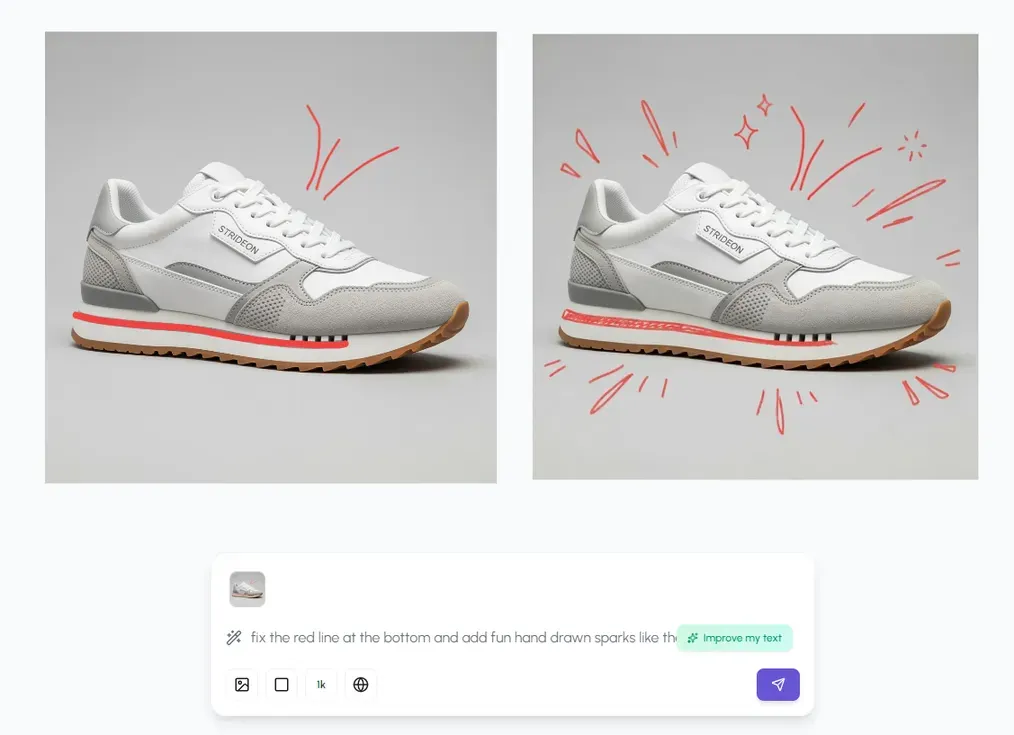
Designers can refine results on the canvas: composition, typography, layout, vector assets, and production polish. That is the difference between an AI image tool and a creative production workspace.
Batch production
Once a process works, teams can turn it into a reusable workflow.
Workflows can take product catalogs, folders, prompts, or CSV inputs and connect steps such as generation, background removal, upscaling, vectorization, reframing, resizing, optimization, and export. Outputs can return to the canvas for review and exception handling.
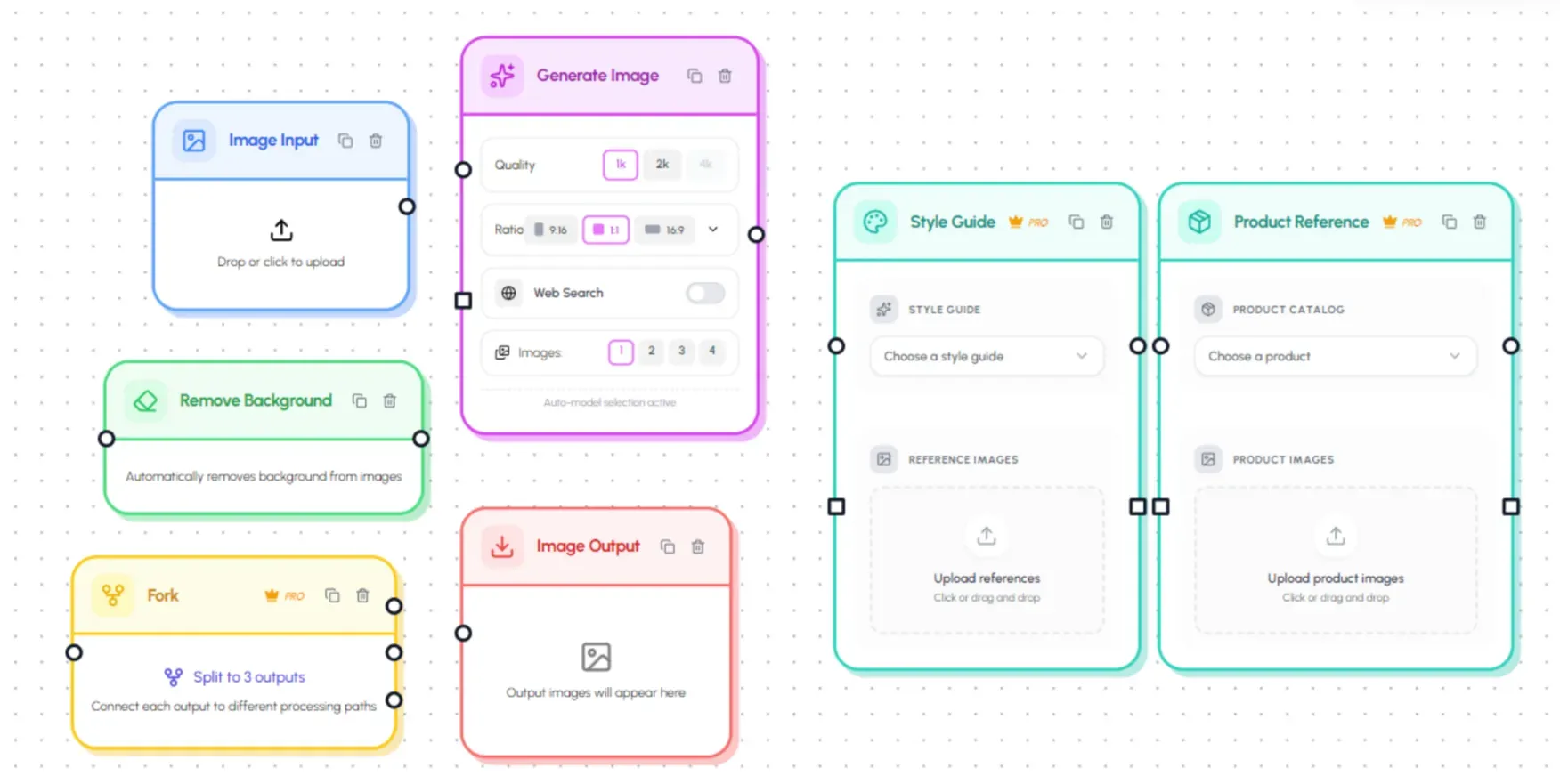

Where Hiding Elephant is strongest
- Persistent product and SKU context
- Brand guides and reusable creative instructions
- AI image generation and short workflow-based video scenes
- Hands-on canvas editing and layout
- Typography, shapes, and vector assets
- Catalog, folder, and CSV batch inputs
- Background removal, resizing, reframing, and optimization
- Collaboration inside shared workspaces
- Listing, campaign, and social creative in one system
Example ecommerce workflow
A beauty brand could:
- Add each SKU and approved pack shot to the Product Catalog
- Connect those products to the correct brand guide
- Generate seasonal lifestyle directions for a hero product
- Refine the winning direction on the canvas
- Add campaign typography and offer treatments
- Turn the repeatable steps into a workflow
- Run the workflow across the rest of the collection
- Create paid-social and marketplace size variants
- Review exceptions on the canvas
- Export or hand off approved assets
Main limitation
Hiding Elephant is broader than a specialist catalog-cleanup or template tool.
If the only job is removing backgrounds from 50,000 marketplace photos, Photoroom may be faster. If the team only needs locked marketing templates for non-designers, Canva may be simpler to roll out. If the deliverable is deep print-ready vector craft, Adobe still wins on finishing depth.
Choose Hiding Elephant when
Choose Hiding Elephant when your team needs to generate, design, adapt, and batch-produce branded content around real products.
It is especially relevant for:
- In-house ecommerce creative teams
- Performance creative teams working across many SKUs
- Brands producing both listing and campaign assets
- Agencies managing several ecommerce clients
- Teams that outgrew disconnected generators, editors, and spreadsheets
Ready to connect products, design control, and batch production?
Explore Hiding Elephant · See product catalog · Build a workflow
2. Pletor
Best for AI-native creative infrastructure
Pletor is the closest alternative in this comparison for teams building reusable creative-production systems.
Its public positioning emphasizes creative infrastructure: brand memory, product context, reusable agents, batch execution, and production systems that can run through different interfaces. Pletor describes itself as infrastructure for scaling on-brand marketing and ecommerce visuals without rebuilding the process for every SKU.

Product context
Pletor is strong on persistent brand and product context. Teams can connect guidelines, references, and product information to reusable creative systems rather than treating each generation as a one-off prompt.
Manual creative control
Pletor’s public story leans more toward systems, agents, and orchestration than toward a designer-first finishing workspace.
That can be the right tradeoff for teams prioritizing automation. Teams that need frequent hands-on layout, typography, and canvas-level correction should test the review and editing experience carefully.
Batch production
This is a core Pletor strength.
Once a creative process exists, Batch can run it across many products or inputs. The value proposition is less “make one image” and more “operate a reusable production system.”
Where Pletor is strongest
- Reusable AI creative systems
- Brand memory and guidelines
- Product-catalog production
- Batch workflow execution
- Agent-operated processes
- API and MCP access
- Images, ads, UGC, and video workflows
How Pletor differs from Hiding Elephant
The overlap is real. The emphasis is different.
Pletor emphasizes creative infrastructure: agents, orchestration, brand memory, batch systems, and external interfaces.
Hiding Elephant emphasizes the loop between automation and a hands-on designer workspace: create and refine on the canvas, scale through workflows, then bring selected outputs back for finishing.
Choose Pletor when
Choose Pletor when your priority is building reusable AI production systems that can run across catalogs, campaigns, and external agents.
3. Photoroom
Best for catalog cleanup and marketplace-ready product images
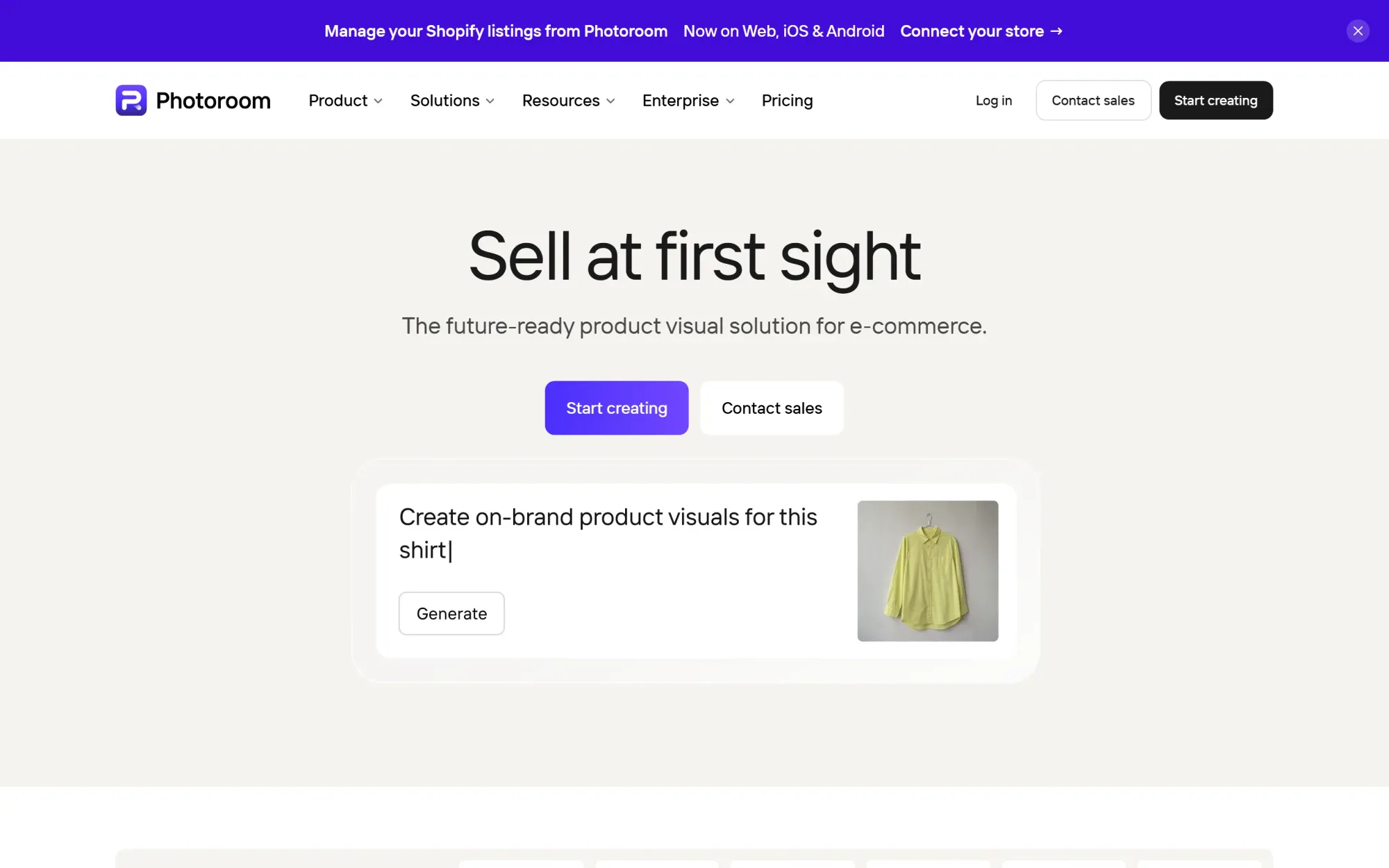
Photoroom is one of the strongest specialist tools for ecommerce product-image processing.
It is particularly good at taking existing product photographs and turning them into clean, consistent listing assets. Photoroom’s batch tools can remove backgrounds, apply consistent backgrounds, add shadows, resize images, reposition products, and process large sets through the web app or API.
Product context
Photoroom works from product photos and can generate product settings, but it is not primarily a brand-and-SKU knowledge system for wider campaign production.
Its strength is visual consistency across listing images, not persistent creative context across ads, social layouts, and multi-step campaign systems.
Manual creative control
There is useful control for product positioning, backgrounds, shadows, and batch edits.
It is less suited as the main workspace for complex campaign layouts, extensive typography, or open-ended design exploration.
Batch production
This is Photoroom’s clearest advantage.
If the job is to standardize thousands of product photos for a marketplace or storefront, Photoroom is often the most efficient option in this list.
Where Photoroom is strongest
- Background removal
- Clean product cutouts
- Marketplace-compliant backgrounds
- Shadows and reflections
- Product positioning
- Batch resizing and conversion
- Catalog consistency
- Web and API production
Choose Photoroom when
Choose Photoroom when your biggest bottleneck is processing large volumes of product photographs into clean, consistent listing images.
4. Canva
Best for accessible template-based ecommerce marketing
Canva is the easiest platform in this comparison to roll out across a broad marketing team.
Its Brand Kit, templates, resizing tools, collaboration features, and bulk creation options make it strong for ads, social posts, banners, promotional videos, and other repeatable marketing formats. Canva can also generate media and support catalog-oriented production workflows for teams that already live inside templates.

Product context
Canva can import product imagery and, in some workflows, catalog data. Brand Kits help keep colors, logos, and fonts consistent.
It is still more template-and-asset oriented than product-intelligence oriented. Persistent SKU records, grounded product generation, and product-aware workflow systems are weaker than in Hiding Elephant or Pletor.
Manual creative control
This is a Canva strength for marketing production.
Non-designers and designers alike can edit layouts, lock brand templates, swap products into campaign frames, and resize for channels with relatively little training.
Batch production
Canva’s Bulk Create and related catalog workflows are strong for template-driven campaigns.
They are less flexible for open-ended AI production pipelines that mix generation, image processing, product fidelity checks, and designer finishing across many custom formats.
Where Canva is strongest
- Ecommerce and advertising templates
- Brand Kits and locked templates
- Social and promo content
- Accessible layout editing
- Bulk creation
- Multi-format resizing
- Team collaboration
- Broad marketing rollout
Choose Canva when
Choose Canva when your priority is enabling a large marketing team to ship consistent product promotions from approved templates.
5. Recraft
Best for AI vectors, graphics, and product mockups
Recraft is one of the strongest AI-first design tools for generating and editing visual assets, especially editable vectors.
It offers native AI vector generation, raster generation, vectorization, brand styles, image editing, background removal, and mockups. That makes it useful for ecommerce teams producing icons, illustrations, packaging graphics, merch art, and product mockups.

Product context
Recraft supports styles, brand colors, references, and mockup workflows. It is strong when the asset itself is the product of the work.
It is less focused on managing a full ecommerce catalog as a persistent production system tied to SKUs, campaign ops, and multi-step channel delivery.
Manual creative control
Recraft is strong here for asset creation.
Designers can generate editable SVG output, work with shapes, refine styles, and produce mockups without treating every result as a flat raster. That is a real advantage for logos, icons, illustrations, and scalable graphics.
Batch production
Recraft can support repeated asset creation and has API access, but it is not primarily an ecommerce catalog-operations platform.
Teams needing structured SKU batching, multi-step creative workflows, and designer finishing across many campaign formats may still need a broader production workspace around it.
Where Recraft is strongest
- Native AI vector generation
- Editable SVG output
- Illustrations, icons, and graphic systems
- Brand styles and colors
- Product and packaging mockups
- Raster editing utilities
- Print-friendly exports
- API access
Choose Recraft when
Choose Recraft when generating editable vectors, graphics, or mockups is the central ecommerce creative job.
6. Adobe Firefly and Creative Cloud
Best for deep professional finishing
Adobe remains the strongest option when craft depth is the priority.
Adobe Firefly brings generative image and editing capabilities into the Adobe ecosystem. Photoshop, Illustrator, and Express remain the finishing environments many professional teams trust for production-grade control.

Product context
Adobe can support brand kits, libraries, custom generative models, and carefully managed asset systems. Enterprise teams can build strong process around that.
What Adobe does not naturally provide is a lightweight product-catalog-to-campaign production workspace for every ecommerce team. Much of the product context still lives in DAM systems, feeds, briefs, and tribal process around Creative Cloud.
Manual creative control
This is Adobe’s clearest win.
If a designer needs precise masking, path work, typography, print prep, or pixel-level correction, Adobe remains difficult to beat. Firefly is most valuable when those generative outputs land inside tools the team already knows how to finish.
Batch production
Adobe can support automation through APIs, scripts, and enterprise workflows, especially for teams with production engineering support.
For many ecommerce creative teams, day-to-day batch production still involves more application switching and manual handoffs than newer AI workspaces designed around catalogs and reusable workflows.
Where Adobe is strongest
- Professional raster finishing
- Deep vector editing
- Typography and production craft
- Commercially oriented generative tools
- Mature file formats and print prep
- Established creative-team workflows
- Enterprise creative operations
Choose Adobe when
Choose Adobe when manual design depth and production craft matter more than keeping product generation, layout, and batching in one system.
Which tool wins each ecommerce job?
Best overall for ecommerce creative production: Hiding Elephant
Hiding Elephant is the strongest fit when the team needs product records, brand context, generation, hands-on design, and batch workflows connected together.
Best for reusable AI infrastructure: Pletor
Pletor is the closest alternative for teams building agent-operated creative systems and catalog-scale production pipelines.
Best for listing-image cleanup: Photoroom
Photoroom is the most efficient specialist for backgrounds, cutouts, and standardized marketplace imagery.
Best for marketing-team templates: Canva
Canva wins when accessibility, Brand Kits, and template campaigns matter more than product-intelligence workflows.
Best for vectors and mockups: Recraft
Recraft is the strongest choice here for editable AI vectors, graphics, and mockup-led asset creation.
Best for professional finishing: Adobe
Adobe remains the deepest option for designers who need precise craft inside Creative Cloud.
Specialist tool, marketing suite, or production workspace?
The decision usually comes down to where the process breaks.
Choose a specialist when
- One task accounts for most of the workload
- The output is highly standardized
- Little campaign design is required
- Another system already handles the rest
Photoroom for catalog cleanup is the clearest example.
Choose a marketing suite when
- Many non-designers need to create content
- Templates and brand locks matter more than open-ended AI workflows
- The main outputs are ads, social posts, and promo graphics
Canva fits that pattern.
Choose a professional craft suite when
- Designers already work deeply in Creative Cloud
- Pixel- and path-level finishing is non-negotiable
- Generative AI is an input into an existing Adobe process
Adobe fits that pattern.
Choose a production workspace when
- Every product needs several content types
- Product and brand context must persist
- Designers need to correct AI output directly
- The same process must run across many SKUs
- Generation, layout, optimization, and delivery need to stay connected
That is where Hiding Elephant is strongest, with Pletor as the closest infrastructure-oriented alternative.
A practical ecommerce benchmark
Before buying into any platform, run the same brief in each tool.
Using one approved product photograph, our brand rules, and one campaign offer, create a clean listing image, two lifestyle scenes, one paid-social ad, one organic social design, and correctly sized variants for each channel. Then repeat the process for four more SKUs.
Score the result on:
- Product accuracy
- Brand consistency
- Designer correction time
- Time to create the next four SKUs
- Number of tools required after generation
- Review and approval friction
This test usually reveals more than a model beauty contest.
One tool may generate the best first lifestyle image and still lose once layout, correction, resizing, and catalog repetition begin. Another may produce a slightly weaker first draft while removing most of the operational drag.
Frequently asked questions
What is the best AI creative tool for ecommerce teams in 2026?
Hiding Elephant is our top overall choice for teams that need product context, manual creative control, and batch production together.
It is not the best specialist for every job. Photoroom may be better for catalog cleanup, Canva for template marketing, Recraft for editable vectors and mockups, Adobe for deep finishing, and Pletor for reusable AI infrastructure.
How is this different from comparing Midjourney-style image generators?
Image generators optimize for impressive single outputs.
Ecommerce teams need systems that keep products accurate, let designers finish the work, and scale the process across SKUs and channels. That is a production problem, not only a generation problem.
How does Hiding Elephant compare with Canva for ecommerce?
Canva is stronger for broad template-based marketing rollout.
Hiding Elephant is stronger when the team needs persistent product context, AI generation grounded in real SKUs, canvas-level creative control, and reusable workflows across catalog production.
How does Hiding Elephant compare with Photoroom?
Photoroom is often faster for standardized listing cleanup.
Hiding Elephant is the better fit when listing images are only one part of a wider creative process that also includes lifestyle concepts, campaign layouts, short video scenes, brand context, and batch workflows.
How does Hiding Elephant compare with Recraft?
Recraft is especially strong for editable vectors, graphics, and mockups.
Hiding Elephant is stronger as an ecommerce production workspace that connects product catalogs, brand context, generation, design finishing, and workflow automation.
How does Hiding Elephant compare with Adobe?
Adobe remains deeper for professional finishing craft.
Hiding Elephant is designed to reduce handoffs between product context, generation, layout, and batch production. Many teams still export selected assets into Adobe when maximum finishing depth is required.
How does Hiding Elephant compare with Pletor?
Both aim at broader creative production than a single-purpose generator.
Pletor leans toward reusable creative infrastructure and agent-operated systems. Hiding Elephant leans toward the connection between a designer workspace and automation.
Can AI preserve exact product details?
Sometimes, and not reliably enough to skip review.
Teams should treat packaging text, logos, proportions, colors, patterns, and regulated claims as review-critical. Strong references, product isolation, and human approval remain essential.
Do ecommerce teams still need designers?
Yes.
AI can generate options and automate repetition. Designers still decide what is accurate, on-brand, commercially useful, and ready to publish. The value of these tools is reducing production drag so designers can spend more time on judgment.
Final recommendation
There is no universal best AI creative tool for ecommerce.
There is a best fit for the bottleneck you actually have.
Choose:
- Hiding Elephant when you need product context, design control, and batch production together
- Pletor when reusable AI infrastructure and agent-operated systems are the priority
- Photoroom when catalog cleanup and listing consistency dominate the workload
- Canva when template-led marketing production across a broad team matters most
- Recraft when editable vectors, graphics, and mockups are the main deliverable
- Adobe when deep professional finishing inside Creative Cloud is non-negotiable
For teams managing the complete process around real products, Hiding Elephant offers the strongest balance of the three requirements that matter most in 2026: product truth, creative control, and scalable production.
Start with Hiding Elephant · Explore ecommerce use cases · See Brand Intelligence